
Getting started with Akismet for Drupal
Last updated:
Akismet protects your Drupal site from spam without getting in your visitors’ way. There are no CAPTCHAs to solve, no cookies, and no third-party scripts on your public pages. Accurate spam filtering runs in the background.
When someone posts a comment, sends a contact message, submits a webform, or creates an account, Akismet checks it against the signals it’s learned from millions of sites. Spam comments wait in a spam queue where you can review them, so a real comment that Akismet gets wrong is easy to rescue.
Requirements
- Drupal 10.3+, 11, or 12
- PHP 8.1 or newer (or whatever your Drupal version needs)
- A Composer-managed Drupal site
- An Akismet API key. Get one at akismet.com.
Install the module
From your Drupal project root, run:
composer require drupal/akismet_antispam -Wdrush en akismet
Keep the -W flag. It lets Composer update the Akismet SDK that the module depends on.
No Drush? Enable Akismet at Administration › Extend instead.
Add your API key
Go to Administration › Configuration › Content authoring › Akismet (/admin/config/content/akismet). Paste your API key and save.
The top of the page shows your Akismet plan and how many API calls you’ve made this month, so you’ll know right away that the key works.
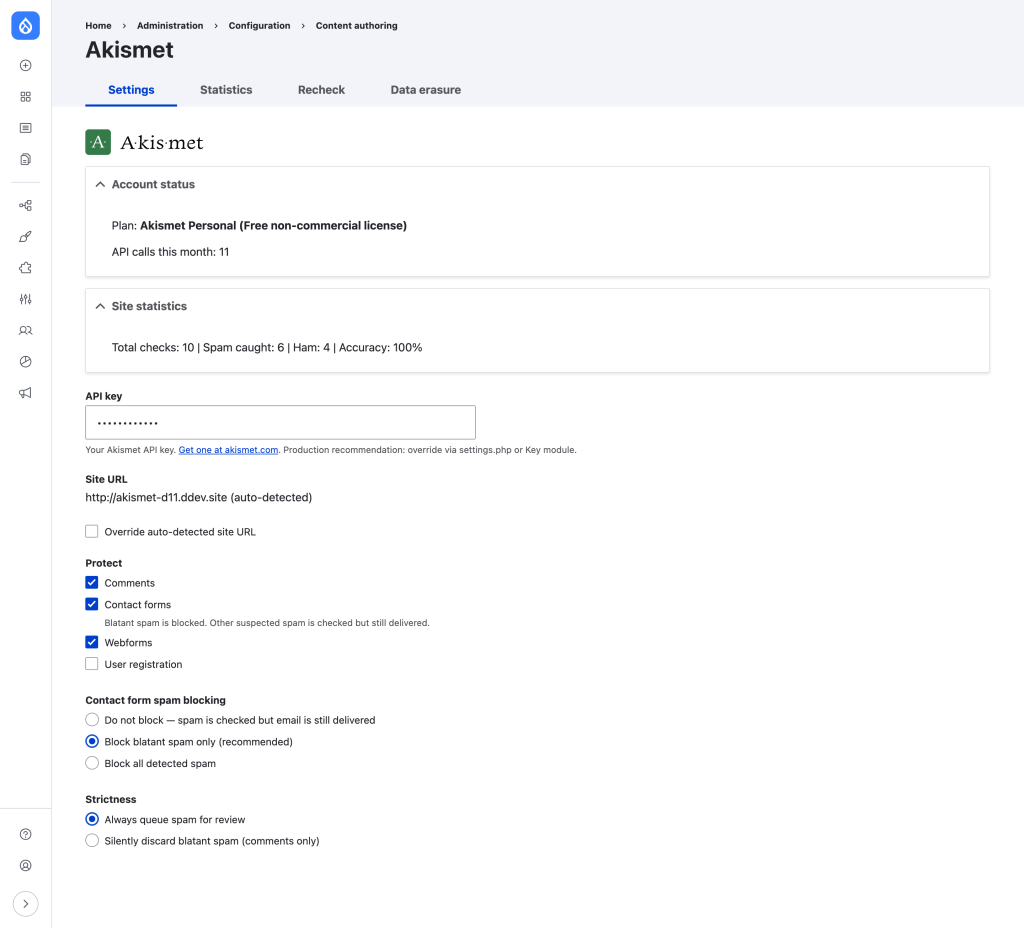
For a production site, keep the key out of exported configuration. Put it in settings.php or store it with the Key module:
$config['akismet.settings']['api_key'] = 'your-api-key';
Then open Administration › Reports › Status report. The Akismet entries confirm your key works. They also warn you about setup problems, like a proxy that hides your visitors’ real IP addresses.
Choose what to protect
The Protect checkboxes on the settings page control which forms Akismet checks:
- Comments. On by default.
- Contact forms. On by default. Blatant spam is blocked, and other suspected spam still gets delivered. You can make that stricter or looser under Contact form spam blocking.
- Webforms. On by default, but each webform also needs the Akismet handler (see below).
- User registration. Off by default. Turn it on to refuse spam signups before the account exists.
Add Akismet to a webform
If you use the Webform module, add the handler to every form you want protected:
- Go to Structure › Webforms and open your form.
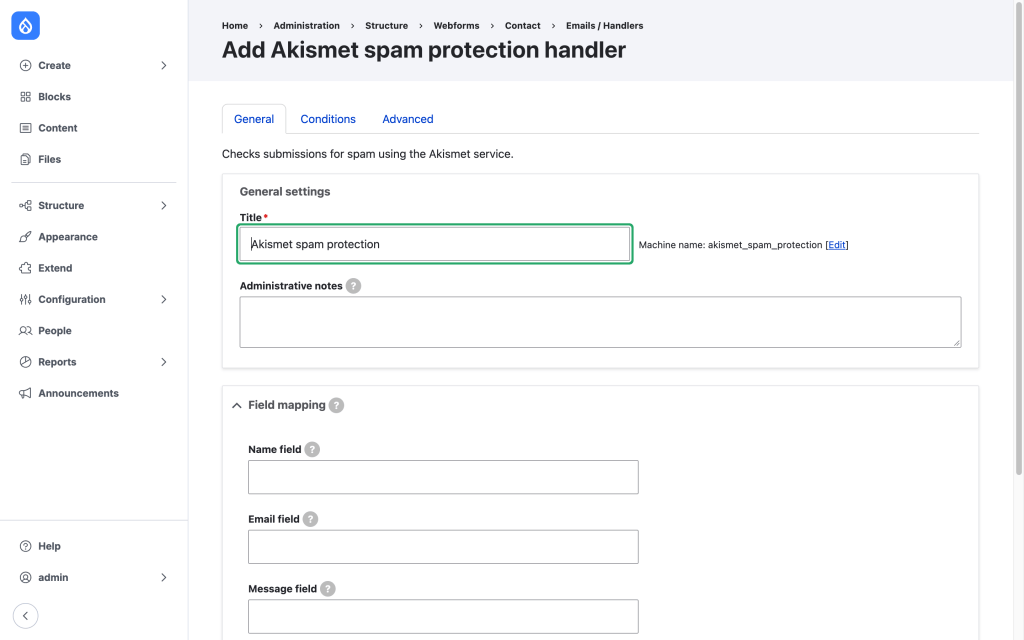
- Click Settings › Emails / Handlers › Add handler.
- Choose Akismet spam protection and save.
The handler finds your form’s name, email, and message fields on its own. You can map them by hand if it picks the wrong ones.
On Drupal 12: Drupal 12 moved the Contact module out of core. Install the Contact project from drupal.org and Akismet protects it the same way. Webform protection needs a Webform release that supports Drupal 12.
Test it
Administrators skip Akismet checks, so a test you run while logged in as an admin never reaches Akismet. To see Akismet catch something:
- Log out, or open a private browser window.
- Post a comment with the name
akismet-guaranteed-spam. - Log back in and open the spam queue (next section). Your test comment is waiting there.
If your site doesn’t allow anonymous comments, log in as a regular test user whose email address is akismet-guaranteed-spam@example.com and post the comment as that user.
More test triggers: How do I confirm Akismet is working?
Review caught spam
Go to Content › Comments › Spam (/admin/content/comment/spam) to see every comment Akismet caught.
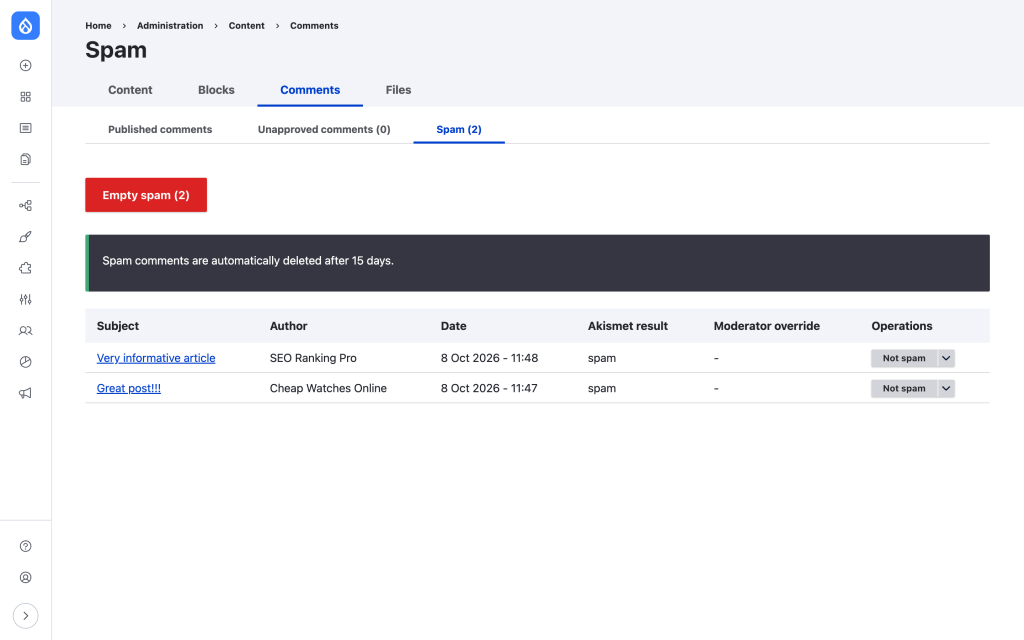
- Click Not spam to publish a comment Akismet got wrong.
- Click Empty spam to clear the queue.
- Spam comments are deleted automatically after 15 days. You can change that under Advanced on the settings page.
- Under each comment, moderators see Akismet’s verdict and a history of every check and moderator decision. Visitors never see it.
Every time you mark something as spam or not spam, the module tells Akismet. That feedback helps Akismet get better at catching spam on your site and everywhere else.
Spam on the other forms never reaches a queue. Akismet refuses contact, webform, and registration spam at the moment it’s submitted, so there’s nothing to clean up later.
Spammers can’t tell they’ve been caught. A spam comment gets the same “your comment has been queued for review” message as any other comment that waits for moderation.
Switching from the community Akismet module?
If your site runs the community-maintained drupal/akismet module, you can switch to the official module in place. Your API key and protection settings carry over. Follow the step-by-step migration guide on drupal.org. The order of the steps matters, so please don’t skip ahead.
Privacy
You can add a short notice under each protected form. It tells visitors the site uses Akismet and links to how their data is processed. Turn on Show privacy notice on protected forms on the settings page.
For your site’s privacy policy, the module’s help page (Administration › Help › Akismet) has suggested wording you can adapt.
Learn more
- Akismet on drupal.org: release notes, the issue queue, and the module’s README, which covers Drush commands, data retention, and GDPR export and erasure.
- Akismet for Drupal
- Upgrade to the official Akismet Drupal module

