
How do I activate the Akismet plugin?
Last updated:
Installing the Akismet Plugin
If you already have the Akismet plugin installed and activated on your WordPress site, you can skip to Adding your API key.
You can activate Akismet in your WordPress dashboard by following these steps.
- Go to Plugins → Add New:

- Type in Akismet in the search box and hit enter/return:

- Typically, the first search result is correct. Make sure the plugin’s author is Automattic and click on Install Now.
- Wait for the installation to finish, then click on the blue Activate button.
Adding your API key
If you are using WordPress v7.0 or higher, you can add your API key by going to Settings → Connectors in WP Admin. In that list, locate Akismet Anti-spam and click “Set up“. You can then enter your API key in the field and click Save. Akismet is then activated on your site.
If you are using an older version of WordPress, do the following:
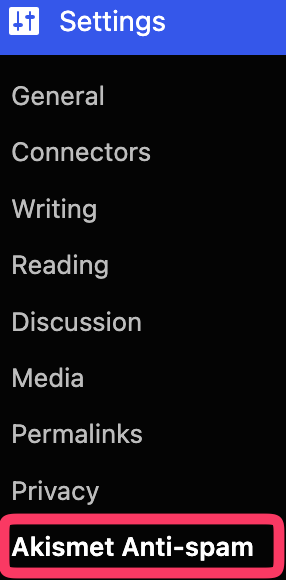
- Go to Settings → Akismet Anti-spam:
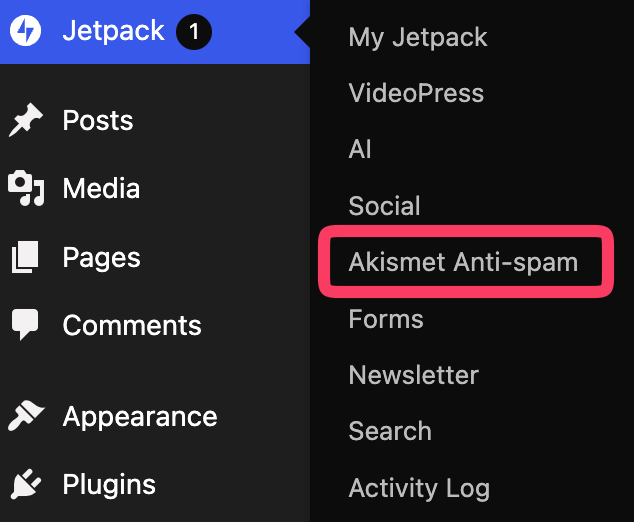
If Jetpack is active on your site, you’ll find the Akismet menu under Jetpack -> Akismet Anti-spam instead:
- Connect your account. Choose the option that applies to you:
- I already have an API key → click the Manually enter an API key link and enter your API key.
- I need an API key → click Set up your Akismet Account, and you’ll be guided through getting one.
- I have Jetpack with a paid plan that includes Akismet → click Connect with Jetpack.
- I have Jetpack connected to my site but would like to use a different API key → click the Manually enter an API key link and enter your API key.
- If you are using Akismet to protect a contact form from spam submissions, please make sure that the contact form you are using is compatible and configured.
Adjust Akismet settings
Once the plugin is activated, there are some options you can adjust in Settings.
Go to your WP Admin and navigate to Settings → Akismet Anti-spam. You can change the following:
- Comments: Show the number of approved comments besides each comment author
- Spam filtering: Silently discard the worst spam, or send everything to the Spam folder for manual review
- Privacy: Choose to display or not display a privacy notice underneath your comment forms, indicating that you are using Akismet.

And that’s it. If you’d like to test Akismet and confirm it is working, see this guide for steps.
If you run into any troubles activating the service, feel free to get in touch.

